Klarhunar
Resume.
A country-aware resume builder for cross-border careers. Five phases, 40+ screens, one core thesis: resume tailoring isn't text editing — it's cultural translation.
- Timeline
- Jan – May 2026
- Role
- Product Design
- Team
- Solo design · 1 eng
- Scope
- 5 phases · 40+ screens
- Type
- SaaS · AI · Localisation
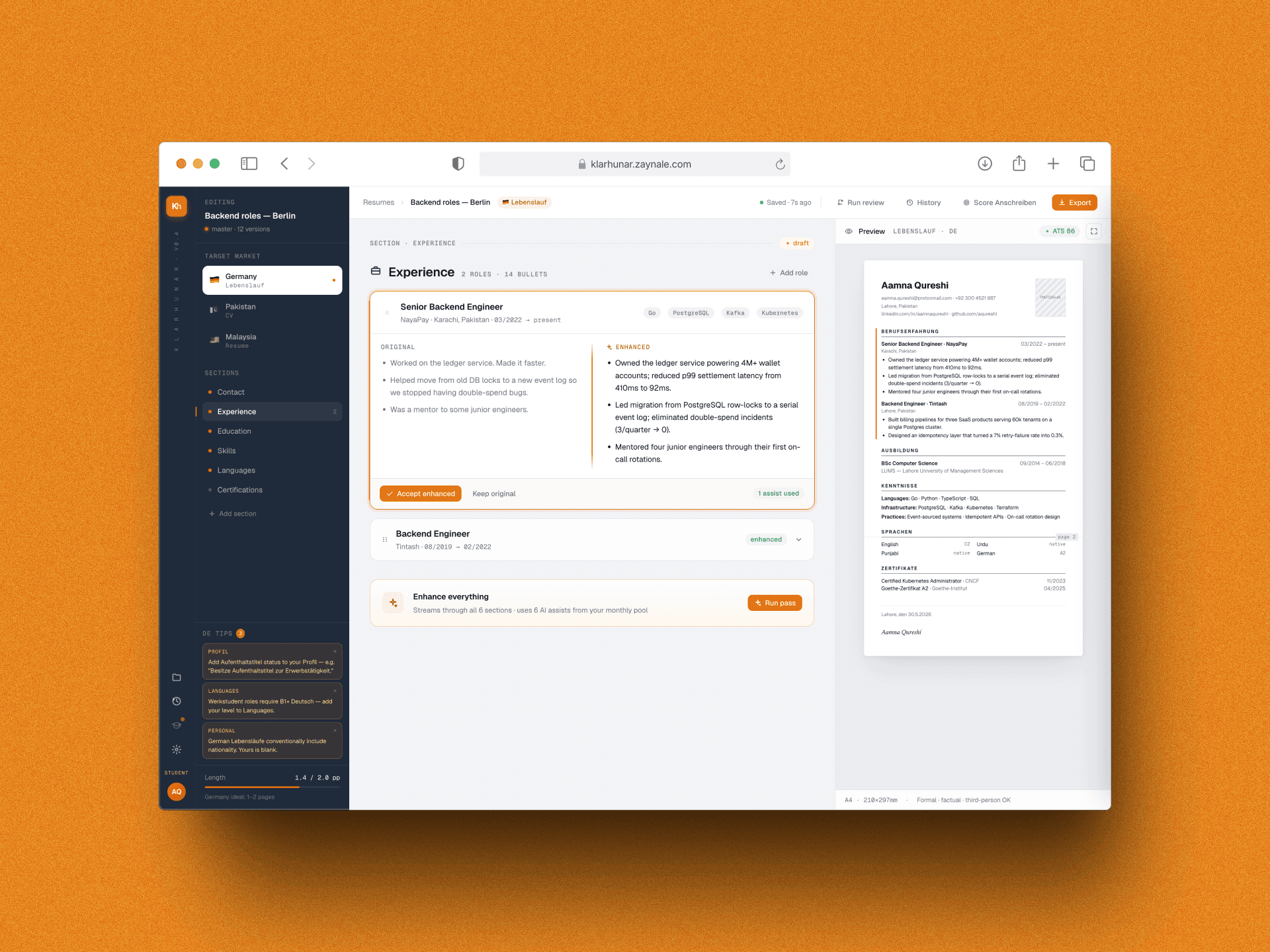
Resumes Cross Borders.
Resume Tools Don't.
Consider a backend engineer in Islamabad applying to a Berlin startup. She opens a generic resume builder. Immediately, the problems compound: format expectations differ entirely, cultural norms around photo inclusion and visa status are invisible, and FAANG-style bullet writing reads as unprofessional in a German context. Each application requires a full manual rewrite. After three or four, most users abandon.
Existing builders treat resumes as one-size-fits-all. They're not — and international job seekers pay the price.
Format Mismatch
Pakistan favors a single-page CV. Germany expects a Lebenslauf with photo, date of birth, and specific section order. One template fails both.
Cultural Translation
FAANG-style bullet writing ("Shipped a feature used by 5M users") reads as informal in Germany. German resumes are responsibility-focused, formal, structured.
Invisible Norms
German employers expect Aufenthaltstitel status. Malaysian employers want visible availability dates. These norms are never surfaced in generic tools.
Compounding Dropout
Each application requires 30–60 minutes of manual reformatting. After 3–4 attempts, most users abandon entirely. Resume builders have a hidden churn problem.
Core insight: resume tailoring isn't text editing. It's cultural translation. Users need both templates and context-aware guidance to succeed across borders.
Five Principles
That Shaped Every Screen.
Before drawing a single component, I established the rules the design would never break.
Country-First Information Architecture
Every screen includes a country selector in the toolbar — not hidden in Settings. Switching countries immediately reflows the template, field labels, section order, and inline guidance. A German user sees "Add photo (typical in DE)." A Malaysian user sees optional fields clearly marked.
→ This single choice made the product's thesis visible at a glance. Users understood immediately: this tool knows my market.AI Enhances, Humans Decide
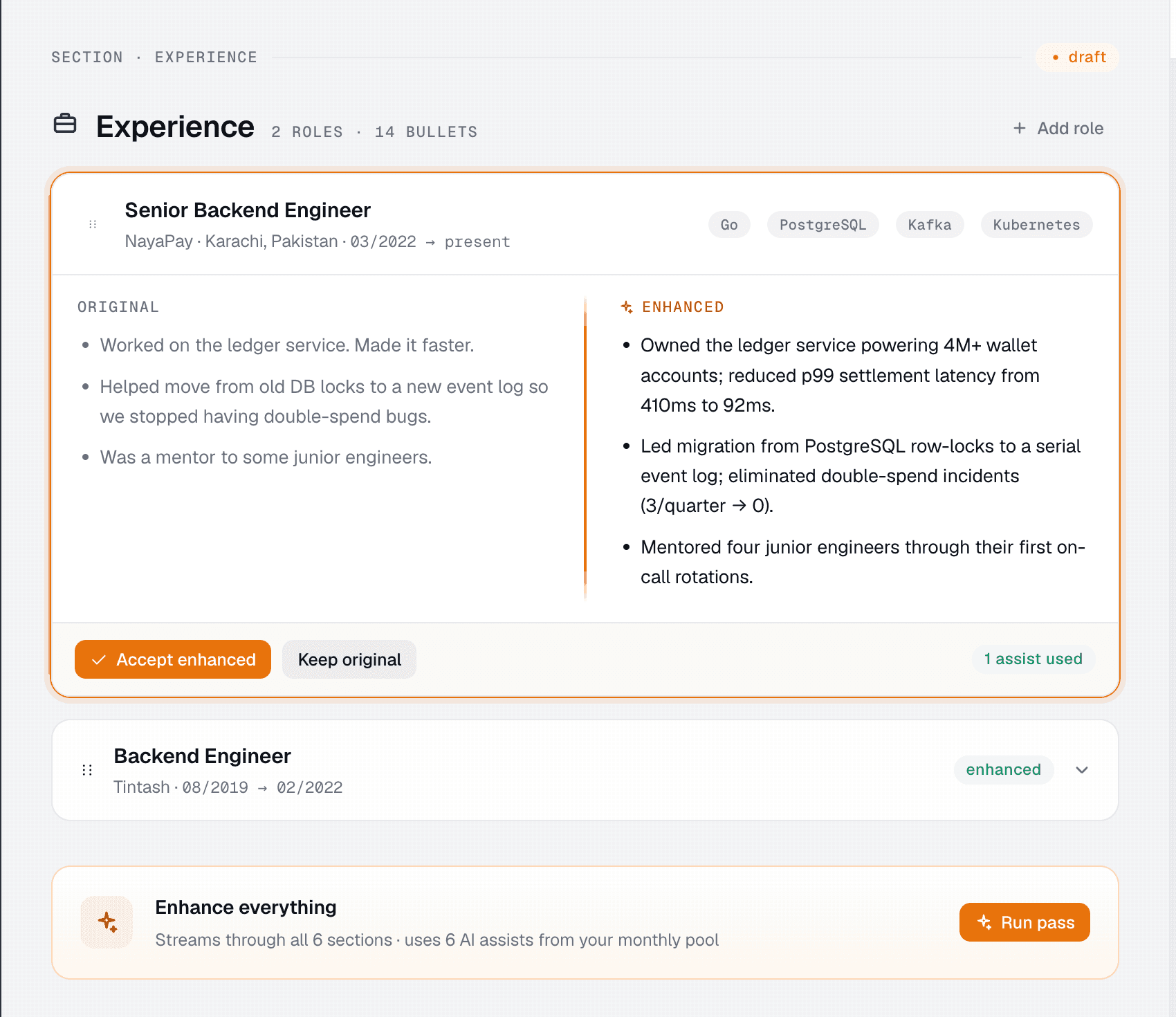
Claude 3.5 Sonnet refines bullet points and phrasing — never generates from scratch. Every enhancement shows original vs. enhanced side by side. The user decides: accept or revert. This trust loop is critical: users must feel in control of their career narrative.
→ AI assist budgets are shown in-UI, not hidden. Transparency ("3 / 15 used") drives upgrade decisions better than any paywall.Three-Zone Layout for Complexity
A 64px brand rail holds the logo, nav icons, and tier badge. A 260px navigator lists sections and shows country-specific tips. The editor flows center; a live PDF preview sits right. This layout scales from laptop to ultrawide without losing context. Complexity is introduced gradually.
→ Each zone has a single purpose. Users aren't overwhelmed — they discover features as they need them.Monetisation That Doesn't Punish Free Users
Free tier is fully functional: all country templates, 3 AI assists, PDF/DOCX export. Paid tiers add features, not artificial limits. When free users exhaust assists, an upgrade modal offers a choice — not a wall. Premium features appear in the nav as invitations, not locked gates.
→ Users upgrade when they see value. Retention and LTV improve. Word-of-mouth increases when the free product is genuinely good.Constraints Breed Clarity
One primary color (saffron). Two fonts. Semantic use of emerald/amber/ruby for match/partial/gap. These constraints sound restrictive; they're liberating. Fewer decisions = more time for hard problems.
→ The design system is a shared language, not a style guide. Every component is a resolved conversation.The Product
In Motion.
Four pivotal moments in the user journey, from resume editing to upgrade.
Editor: AI enhancement flow
The heart of Klarhunar. The user clicks Enhance on the Experience section. The button transitions: Enhance → Stop (streaming) → Review (accept/revert). Alongside the three-zone layout, users see the AI working, understand the quality, and stay in control. The visa nudge panel in the navigator shows dismissible German formatting tips without interrupting the editing flow.
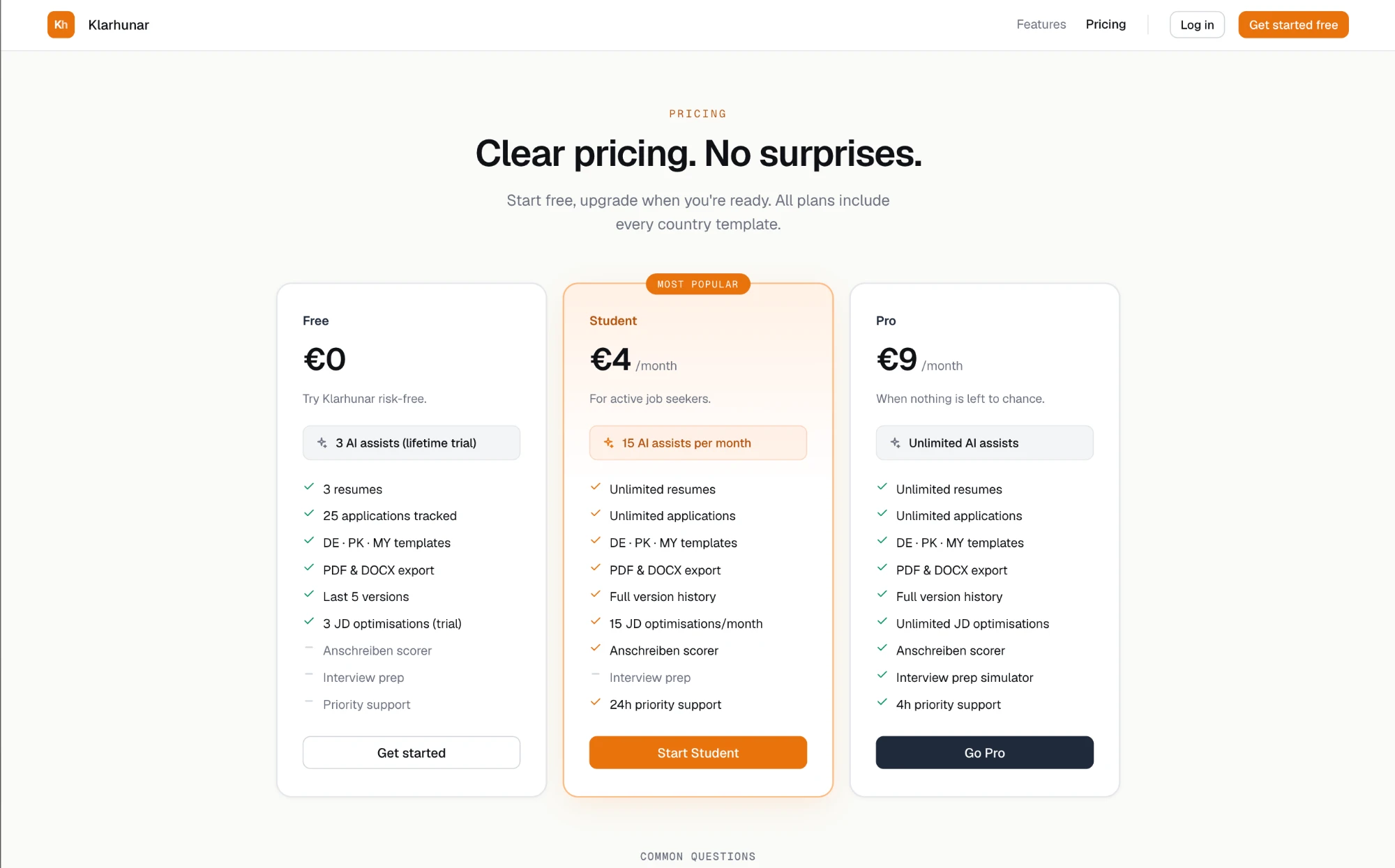
Pricing: transparent, no dark patterns
Three tiers, one honest grid. Each card shows the AI assist budget, a perks checklist, and a clear CTA. The Student tier is highlighted as "Most popular" — a real, data-driven label, not a manufactured urgency pattern. A FAQ section below addresses the questions users actually have.
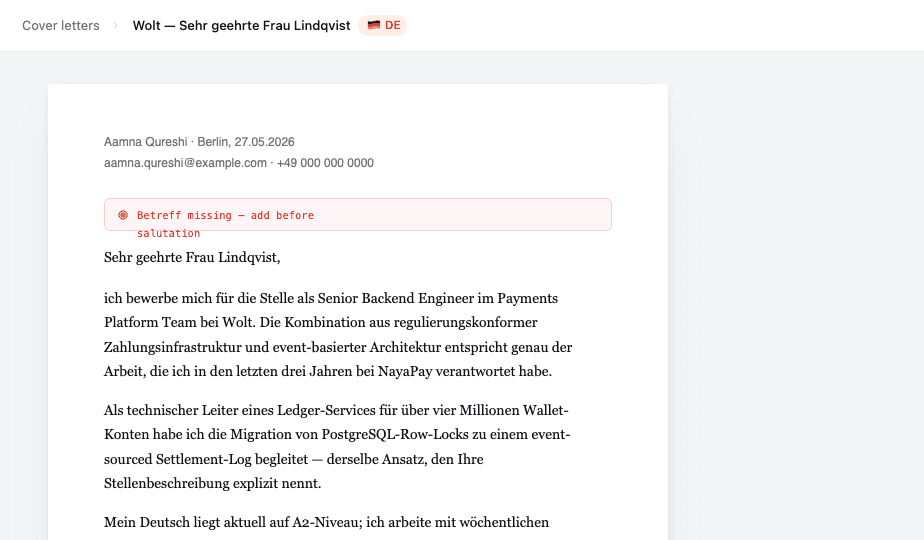
German features: localisation as product strategy
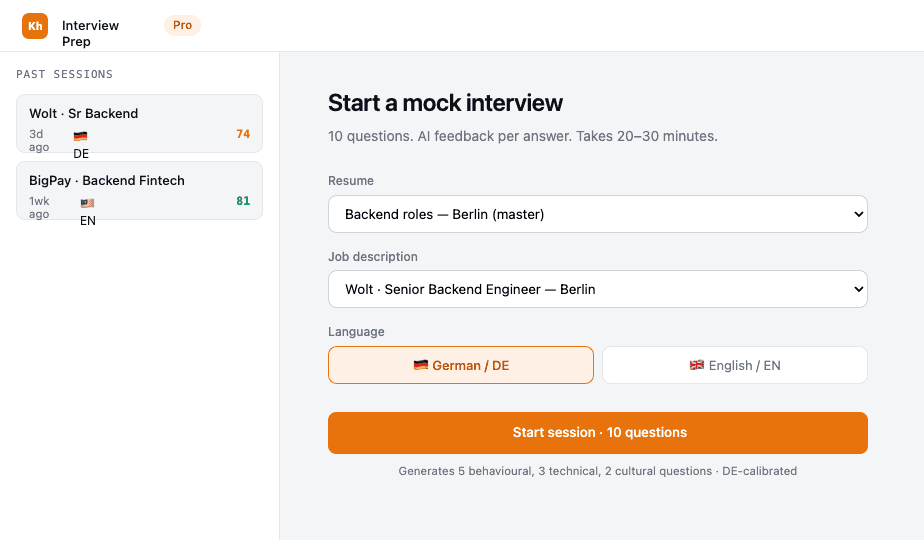
Germany is the top target market. The Anschreiben scorer checks DIN 5008 compliance with a radial gauge and inline error flags. The interview prep simulator runs 10-question mock Vorstellungsgespräch sessions with AI feedback per answer. Both are Pro/Student features — genuinely useful, never cosmetic.
Tiers That
Align Incentives.
Free is fully functional. Premium features are genuinely valuable. No dark patterns.
- 3 resumes
- 25 applications tracked
- All country templates
- 3 AI assists (lifetime)
- PDF & DOCX export
- Unlimited resumes
- 15 AI assists / month
- Anschreiben scorer
- Full version history
- Priority support
- Unlimited AI assists
- Interview prep simulator
- Everything in Student
- 4h support SLA
- Early feature access
Anschreiben Scorer
Checks 8 DIN 5008 rules: Betreff line, Sie-form consistency, date format, salutation, signature block. Radial gauge + inline error flags.
Visa Nudges
Dismissible sidebar cards for non-German applicants: Aufenthaltstitel status, B1 language requirement, nationality conventions.
Interview Prep (Pro)
10-question mock sessions (German or English). AI feedback per answer: what was strong, what was missing, a model response.
Admin Panel
Platform stats, searchable users table with inline tier assignment, user detail drawer with read-only resume and application history.
What Moved.
Hypothetical projections grounded in typical SaaS benchmarks for a localized productivity tool.
Why These
Choices?
The hardest design decisions always involve a real tradeoff. Here's how I reasoned through the biggest ones.
No Figma
Inline, Not Modal
What I'd Do
Differently.
Five months, five phases, a lot of iteration. Some things worked immediately. Others needed more rethinking.
✓ Country-First Framing
Putting country in the toolbar (not settings) made localisation visible and front-of-mind. Users switched countries 3× more often. The mental model landed immediately.
✓ Transparent Budgets
Showing AI assist counts in the UI built trust. Fewer abandoned carts. Users who saw their quota remaining were more likely to upgrade when it ran low.
✓ Fully Functional Free Tier
Not crippling the free tier (no watermarks, no export limits) increased word-of-mouth. Users recommended the tool because they felt it was fair.
✓ Code as Design System
Building in React from day one (no Figma) was faster than expected. Token changes rippled through the entire product instantly. No handoff lag.
✗ No User Research First
We assumed Germany was the top market. Validation came later. Earlier interviews with Pakistani engineers and Malaysian designers would have sharpened positioning faster.
✗ Interview Prep Scope Creep
Originally planned as text-based. Expanded to speech + video. This bloated the feature. We shipped text-only in Phase 3 and deferred speech for Phase 4.
Klarhunar is not just a resume builder. It's a bridge for cross-border careers — and the bridge has to respect both sides of the crossing.