Harlow
Legal.
A boutique commercial law firm sitting on 800+ contracts, NDAs, and agreements — all locked in PDFs with no way to query them. We built a document intelligence pipeline using Mistral OCR, OpenAI embeddings, Qdrant, and Gemini RAG that turned the static archive into a searchable knowledge base solicitors can query in plain English.
- Client
- Harlow Legal
- Year
- 2025
- Timeline
- 5 weeks
- Role
- Automation Design & Build
- Stack
- n8n · Mistral OCR · OpenAI · Qdrant · Gemini
800 Contracts.
Zero Ways to Search Them.
Harlow Legal is a boutique commercial law firm specialising in contracts, IP, and employment matters for SMEs and scale-ups. Over several years of practice they had accumulated a substantial document repository — NDAs, service agreements, employment contracts, IP assignments, partnership agreements — stored across email threads, a shared Drive, and a file server.
The problem wasn't that the knowledge didn't exist. It was that no one could access it quickly. Researching precedents, checking a counterparty's prior agreements, or finding every contract with a specific governing law clause required manual browsing — opening documents one by one, reading through them, closing them. For a high-volume commercial practice, 30–45 minutes of research time per question was unsustainable.
Four Problems
Before a Solicitor Could Answer a Question.
No cross-document querying
Every research question required opening individual documents. Finding all contracts where Harlow was the governing-law jurisdiction, or every NDA signed with a specific counterparty, meant trawling through email and Drive manually. There was no way to query the archive as a corpus.
Scanned documents were invisible
Roughly 30% of the archive consisted of scanned PDFs — signed agreements, faxed documents, older contracts. These were unsearchable by any file-level tool. They existed in storage but were effectively inaccessible unless someone opened them and read them manually.
Knowledge siloed per solicitor
Institutional knowledge about what terms the firm had agreed to, which counterparties had specific risk preferences, and what precedents existed lived in solicitor memory — not in any queryable system. When a solicitor left or a matter changed hands, that knowledge walked out with them.
Research time destroying billable capacity
Preliminary document research — before any substantive legal work — was consuming 30–45 minutes per question. At several questions per matter per week, research overhead was eating a significant portion of the team's billable capacity before any advice was given.
Core insight: the lawyers already owned the knowledge. It was trapped in PDFs. The task wasn't to generate new information — it was to make the existing archive queryable. That's a retrieval problem, not an AI problem.
Four Principles
That Shaped the Architecture.
RAG for legal documents carries specific constraints that differ from general document Q&A. Source attribution, scanned document handling, and query mode flexibility were agreed before any build began.
OCR as a first-class step, not a fallback
30% of the archive was scanned. Rather than treating OCR as an edge case, Mistral's document-native OCR was built into every ingestion run — all PDFs pass through it, regardless of whether they appear text-selectable. Mistral's model handles multi-column legal layouts, tables, footnotes, and signature blocks that generic vision APIs mangle.
→ Processing all documents through OCR rather than branching on file type removed a significant source of downstream noise — different text extraction quality for different documents.Chunk overlap to protect clause integrity
Legal clauses don't respect page breaks. A termination provision can start on page 7 and continue on page 8. Token Splitter was configured with chunk overlap large enough to ensure no clause was split mid-sentence across chunk boundaries — at the cost of slightly larger index size, which was an explicit tradeoff.
→ A missed overlap setting in week one caused the system to return half a limitation-of-liability clause. The chunk overlap was doubled. Accuracy requires conservative chunking.Source citation in every answer
Every Gemini response includes the source document name, page number, and a direct link to the original PDF in Drive. Solicitors cannot rely on an answer without being able to verify it. The RAG pipeline was designed so that every response is traceable — a citation isn't a nice-to-have, it's the trust mechanism that makes the system usable in a professional context.
→ Early testing without citations resulted in solicitors re-reading the source document anyway. With citations, they verify selectively rather than always.Light mode vs. full mode for different query types
Full mode embeds raw extracted text — highest fidelity, best for specific clause retrieval. Light mode summarises each page with Gemini before embedding — faster retrieval, lower cost, better for broad thematic questions (“what are our standard indemnity positions?”). Users toggle between modes via the chat interface. The choice of mode is logged with every query for calibration.
→ 70% of queries use light mode. Solicitors optimise for speed on preliminary research and switch to full mode only when they need to verify exact wording.Six Nodes.
End-to-End Document Intelligence.
Each node handles exactly one concern. OCR, chunking, embedding, storage, and retrieval are separate steps — making the pipeline debuggable, replaceable, and scalable independently.
Trigger
A PDF lands in a watched Google Drive folder. The n8n workflow triggers automatically via Drive webhook — no manual action required. Sender info, file name, and intake timestamp are captured and carried through the pipeline as metadata.
Mistral OCR
The PDF is uploaded to Mistral's OCR API, which extracts text and structural metadata from both digital and scanned documents. Mistral's document-native OCR handles multi-column legal layouts, tables, and footnotes that generic vision APIs misread. Text is split into page-level chunks for processing.
Chunk & Tokenize
Extracted text is passed through a Token Splitter node with configured chunk size and overlap. Overlap prevents clauses from being split across chunk boundaries — a key concern in legal documents where a termination clause can span two pages.
Embed
Each chunk is converted to a 1536-dimension vector embedding using OpenAI's embedding model. An optional summarization step using Google Gemini condenses each chunk first — enabling a "light mode" that trades document richness for faster retrieval and lower cost on preliminary searches.
Store in Qdrant
Embeddings are stored in a Qdrant vector database alongside metadata: source document, page number, chunk index, matter type, and intake date. On first run, the collection is created with the correct vector size and cosine distance metric. Subsequent runs refresh the collection without duplication.
RAG Q&A
A solicitor or paralegal submits a natural language question via a chat interface. Qdrant retrieves the top-k most relevant chunks by cosine similarity. Google Gemini generates a grounded, cited answer from the retrieved context — with source document and page references included in every response.
Inside the n8n Workflow
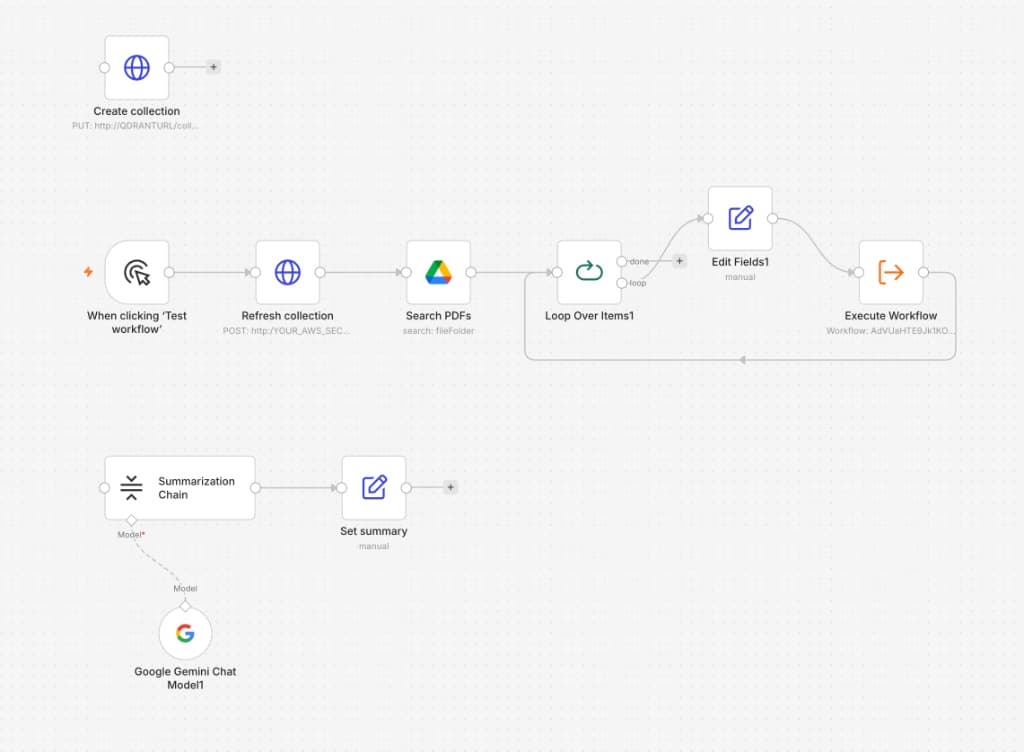
Scans a Google Drive folder and dispatches each PDF to the ingestion sub-workflow — one trigger indexes the entire contract library, however large.
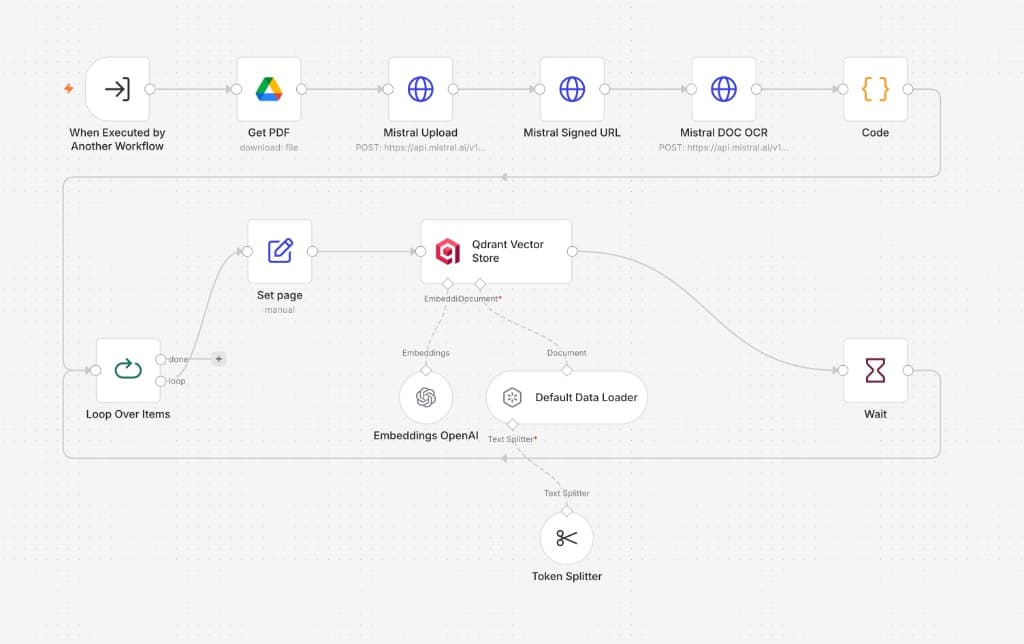
Each PDF is OCR'd by Mistral, split into chunks, and embedded by OpenAI — stored in Qdrant with page-level metadata so every answer can cite its exact source.
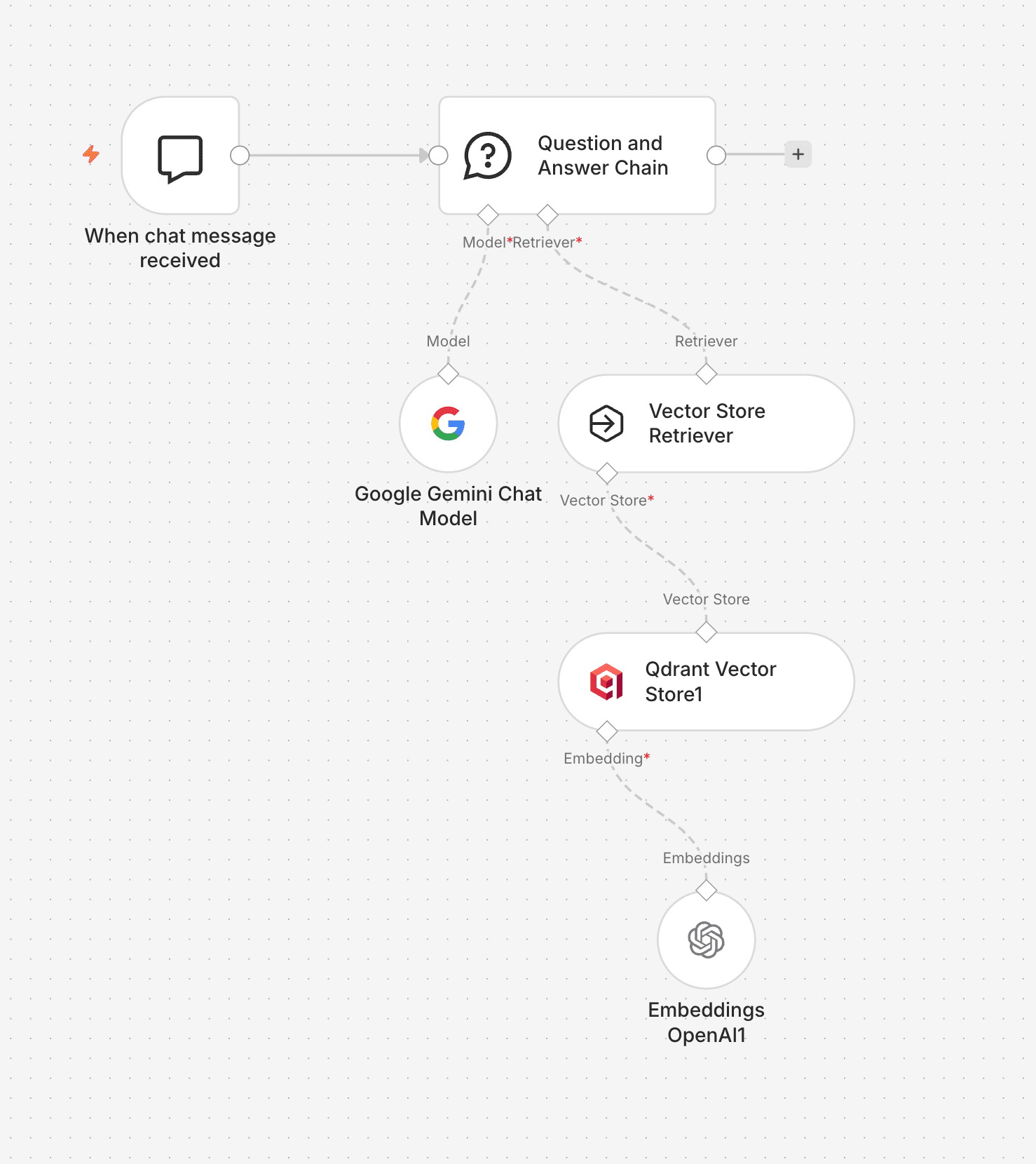
A plain-English question retrieves the most relevant contract clauses from Qdrant, and Gemini returns a cited answer — document name and page number included.
Before vs. After
800 Documents.
Queryable in Seconds.
Measured at 60 days post-launch. The primary metric was research time per question — the firm cared less about throughput and more about the hours returned to substantive legal work.
Why These
Choices?
Three calls that shaped the build, each with a real tradeoff.
Google Vision
Pinecone
for RAG answers
What I'd Do
Differently.
Five weeks building a RAG pipeline on a real legal document corpus. A few things I'd scope differently next time.
✗ Chunk overlap needed tuning earlier — defaults broke legal clauses
The default Token Splitter overlap split a limitation-of-liability clause mid-sentence across two chunks in week one. The Qdrant query returned half a clause — which is worse than no result. Chunk overlap should be validated against the document type before any embeddings are stored: a missed clause in a legal document has professional consequences that a missed paragraph in a knowledge base does not.
✗ Index refresh strategy needed agreement upfront
The first version rebuilt the entire Qdrant collection on every ingestion run. With 800 documents, that's expensive. Switching to an incremental update strategy mid-project required collection schema changes and a re-indexing run. Document update strategy (full rebuild vs. delta indexing) should be agreed before build, not discovered as a cost issue at week three.
✓ Light mode vs. full mode was the right call — solicitors optimise instinctively
No one needed to be told which mode to use for which query type. Within the first week, solicitors were instinctively using light mode for broad research questions and switching to full mode when they needed to verify exact wording. Giving users control over the richness/speed tradeoff — rather than optimising for one — turned out to be the right call. The query log confirmed the split: 70% light, 30% full.
✓ Source citations were the adoption mechanism, not a feature
Every Gemini response includes the document name, page number, and a Drive link. Solicitors adopted the system because they could verify any answer in one click — they didn't have to trust the model, they could check it. In professional contexts where errors carry liability, the ability to verify is what makes AI tools usable. Citation isn't polish. It's the product.
We had years of contracts and agreements that nobody could query. Now a solicitor can ask a question in plain English and get a cited answer from the right document in under a minute.James Harlow, Principal Solicitor — Harlow Legal